How to make a nutrition facts label (2026 FDA guide)
Everything between “I have a recipe” and “I have a print-ready, FDA-compliant Nutrition Facts label” — serving sizes, nutrient data, the 21 CFR 101.9 math, formats, the ingredient statement, and allergens. Written from the actual regulation, not vibes.
key takeaways
- A compliant Nutrition Facts label is an eight-step mechanical process: serving size → nutrient data → per-serving math → rounding → %DV → format → ingredient statement → allergens.
- Serving sizes aren’t yours to choose — they come from the FDA’s RACC tables, expressed as a household measure plus grams.
- The FDA accepts nutrient-database calculation (USDA FoodData Central) — you usually don’t need a lab test.
- Nine major allergens (including sesame) must be declared by name; the ingredient list runs in descending order by weight.
- Export vector files (SVG/PDF) for print — a blurry PNG on a 5,000-unit run is an expensive mistake.
on this page +−
- 1. Determine the serving size (RACC)
- 2. Gather nutrient data
- 3. Calculate per-serving amounts
- 4. Apply FDA rounding rules
- 5. Compute % Daily Values
- 6. Choose the label format
- 7. Write the ingredient statement
- 8. Declare allergens
- 9. Print specs & export
- 10. Database vs lab analysis
- 11. 7 mistakes that get labels rejected
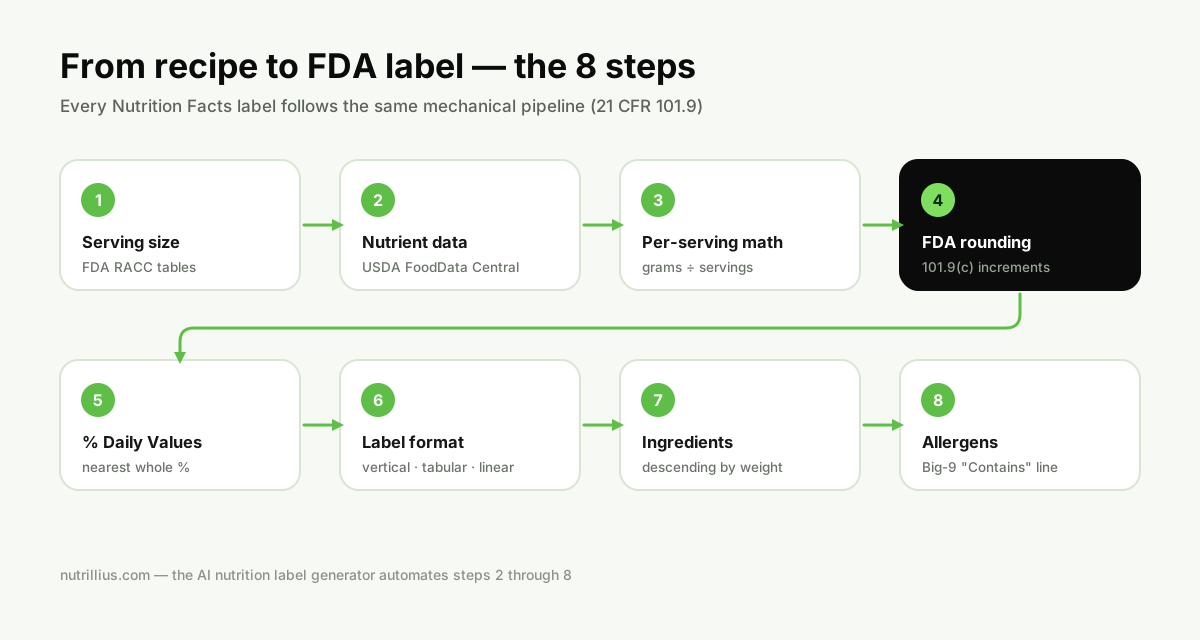
A Nutrition Facts label looks simple — a black-and-white box with some numbers. Under the hood it’s one of the most tightly specified pieces of design in American commerce: 21 CFR 101.9 dictates the exact nutrients, the exact order, the exact rounding increments, the type sizes, even the thickness of the horizontal rules. The good news: once you understand the eight steps below, the process is completely mechanical — which is also why software can do most of it for you.
1. Determine the serving size (RACC)
You don’t get to pick a flattering serving size. The FDA publishes Reference Amounts Customarily Consumed (RACCs) — standardized amounts for every food category (e.g. cookies ≈ 30g, beverages ≈ 240mL, hot sauce ≈ 5mL... the exact value depends on your category). Your declared serving size must be based on the RACC for your product category, expressed as a household measure plus the gram weight, like “2/3 cup (55g)” or “1 bar (40g)”.
- Find your category in the FDA’s RACC tables (21 CFR 101.12).
- Convert the RACC into a sensible household unit for your product (pieces, cups, tbsp).
- Servings per container= net contents ÷ serving size, with its own rounding conventions (e.g. “about 2.5”). Packages containing 200%–300% of the RACC may also need dual-column “per serving / per container” labeling.
2. Gather nutrient data for every ingredient
For each ingredient you need nutrient values, normally per 100 grams: calories, total fat, saturated fat, trans fat, cholesterol, sodium, total carbohydrate, dietary fiber, total sugars, added sugars, protein, vitamin D, calcium, iron and potassium. Sources, in order of convenience:
- USDA FoodData Central — the government reference database; free and FDA-accepted for label calculation. (This is what the Nutrillius ingredient library is built on — 7,700+ ingredients.)
- Supplier spec sheets— for commercial ingredients (chocolate chips, flavor bases), the manufacturer’s spec is usually more accurate than a generic database entry.
- Lab analysis — for the edge cases covered in step 10.
3. Calculate per-serving amounts
The math itself is straightforward:
- Convert every recipe quantity to grams (1 cup of flour ≈ 125g, 1 tbsp of honey ≈ 21g — cup weights differ per ingredient, which is where most DIY spreadsheets go wrong).
- For each nutrient: sum (grams of ingredient ÷ 100) × per-100g value across all ingredients.
- Divide each total by the number of servings.
4. Apply the FDA rounding rules
You cannot print raw calculated numbers. 21 CFR 101.9(c) assigns each nutrient its own rounding increments — calories under 5 become 0, calories from 5–50 round to the nearest 5, above 50 to the nearest 10; cholesterol between 2 and 5mg is declared as “less than 5mg”; carbohydrate under 0.5g becomes 0, and so on. We published the complete tables in our FDA rounding rules guide — it’s the same logic the Nutrillius engine runs.
5. Compute % Daily Values
Percent Daily Value is calculated by dividing the per-serving amount by the FDA’s Daily Value for that nutrient (e.g. 78g total fat, 2,300mg sodium, 50g added sugars, 28g fiber) and expressing it to the nearest whole percent. Two subtleties people miss:
- The FDA permits calculating %DV from the unrounded amount, which occasionally produces a %DV that looks inconsistent with the rounded gram value — that’s expected and correct.
- Trans fat and total sugars get no %DV — no Daily Value has been established for them.
6. Choose the label format
| Format | When it’s used |
|---|---|
| Vertical (standard) | The default full panel — required whenever you have the space. |
| Tabular (side-by-side) | Allowed when the package can’t accommodate the vertical panel (limited vertical space). |
| Linear (single paragraph) | For very small packages (roughly 40 sq in or less of available label space) where even tabular won’t fit. |
There are also special cases — dual-column (as packaged / as prepared), simplified format when 8+ nutrients are zero, and aggregate formats for variety packs. Nutrillius generates vertical, tabular and linear formats with a live preview of each.
7. Write the ingredient statement
Separate from the panel, 21 CFR 101.4 requires every ingredient listed in descending order by weight, by its common or usual name, with multi-component ingredients broken out in parentheses — e.g. “chocolate chips (sugar, chocolate liquor, cocoa butter, soy lecithin)”. Water counts as an ingredient (at its added weight). Get the order from your gram weights in step 3 — never guess it.
8. Declare major allergens
Federal law (FALCPA, plus the FASTER Act which added sesame in 2023) recognizes nine major allergens: milk, eggs, fish, crustacean shellfish, tree nuts, peanuts, wheat, soybeans and sesame. You must identify them either in the ingredient list by their common names or in a separate “Contains:”statement immediately after it — “Contains: Milk, Wheat, Soy.” Species matter for fish, crustacean shellfish and tree nuts (declare “almonds”, not just “tree nuts”).
9. Print specs & export
- Type sizes are regulated: “Nutrition Facts” must be the largest text on the panel; core information generally can’t drop below 8-point (6-point on small packages), with specified hairline and bar thicknesses.
- Export vector when you can — an SVG or vector PDF stays razor sharp at any print size; a low-resolution PNG on a 5,000-unit print run is an expensive mistake.
- Print black on white (or another single dark color on a light contrasting background) — decorative color inside the panel is not allowed.
10. Database calculation vs lab analysis
The FDA accepts either method. Database calculation (what this guide — and Nutrillius — uses) is accurate and dramatically cheaper for most recipes made from known ingredients. Send a sample to a lab when:
- Processing changes composition in ways you can’t model — deep frying, fermentation, smoking, extrusion;
- You’re making a nutrient content claim (“high protein”, “low sodium”) you may need to defend with data;
- Your supplier data is incomplete or untrustworthy.
A full lab panel typically runs hundreds of dollars per revision, which is why most small brands start with database calculation — see the full breakdown in how much a nutrition label costs.
The 7 mistakes that get labels rejected
After the process itself, here’s what actually goes wrong. These are the errors buyers, co-packers and regulators catch most often:
- Volume-to-gram guessing.Using one universal “cup = 240g” conversion. A cup of flour is ~125g, a cup of honey ~340g — get this wrong and every number downstream is wrong.
- Batch weight instead of baked weight. Ignoring moisture loss (step 3) understates every nutrient per serving.
- Self-serve serving sizes.Declaring a 15g “serving” of cookies to flatter the calories — the RACC says otherwise, and buyers check.
- Printing unrounded numbers.“187 calories” flags the label as amateur instantly — see the rounding tables.
- Ingredient list in recipe order. It must be descending by weight — recipe order is a different order.
- Missing hidden allergens.Soy lecithin in chocolate, wheat in soy sauce, milk in “natural flavor” butter powder. Trace every compound ingredient.
- Low-res raster art at print. The panel must stay legible at regulated type sizes — send your printer vector SVG or PDF, never a screenshot.
nutrillius · free to build
Build your label free in the Nutrillius generator
Add your ingredients in cups, tablespoons or grams and watch a print-ready, FDA 21 CFR 101.9-format Nutrition Facts panel build itself — rounding, %DV, allergens and the ingredient statement included. Free to build; pay only when you download.
Create Label Now →No account needed · PNG · PDF · SVG from $39
Frequently asked questions
Is it legal to make your own nutrition facts label?
Yes. The FDA does not require you to hire a consultant or a lab — it requires the finished label to be accurate and formatted per 21 CFR 101.9. The FDA explicitly accepts calculating nutrition values from nutrient databases (like USDA FoodData Central). Many small brands make their own labels with software and have them reviewed before printing.
Do I need a lab test to make a nutrition label?
Usually not. Database calculation works for most mixed, baked and packaged foods. Lab analysis makes sense when nutrients change during processing you can't model — frying (oil uptake), fermentation, smoking, or when you're making nutrient content claims you must be able to defend. Full details in our cost guide.
What are the 2026 label changes I should know about?
The current panel format dates to the FDA's 2016 update (mandatory since 2020/2021): larger calories, Added Sugars, vitamin D and potassium instead of vitamins A and C. The front-of-package “Nutrition Info” box is still a proposed rule with no compliance deadline. What is final is the updated “healthy” claim definition (compliance February 2028). Build your panel on the current rules.
Am I exempt from nutrition labeling as a small business?
Possibly. FDA regulations include small-business exemptions — for example, low-volume products from businesses under certain employee/unit thresholds can qualify if they file an annual notice with the FDA, and the exemption is void if the label makes any nutrition claim. Cottage-food producers often fall under these exemptions too — see our cottage food labeling guide. Verify your specific situation against FDA guidance.
What's the fastest way to make a compliant label?
Use a generator that implements the FDA math for you. Nutrillius turns a recipe into a 21 CFR 101.9-format panel in minutes — it applies the rounding rules, computes %DV, writes the ingredient statement and allergen declaration, and exports print-ready PNG, PDF and SVG.
Sources & references
Written from the primary regulation. We link the actual rule so you can verify every serving size, threshold and requirement at the source.
Keep reading
FDA nutrition label rounding rules — the complete tables
Every increment from 21 CFR 101.9(c): calories, fat, sodium, carbs, protein and micronutrients.
Read →How much does a nutrition label cost in 2026?
Nutritionist vs lab vs software — real price ranges and when each is worth it.
Read →The best nutrition label generators, compared
Nutrillius vs ReciPal vs Food Label Maker vs MenuSano and the free tools.
Read →Nutrition labels for cottage food businesses
What home-kitchen producers actually must put on a label — and when Nutrition Facts are optional.
Read →