FDA nutrition label rounding rules: the complete tables
You can't print raw calculated numbers on a Nutrition Facts label — every nutrient has its own legally required rounding increments. Here they all are, nutrient by nutrient, with worked examples. This is the exact logic the Nutrillius engine implements.
key takeaways
- Every nutrient on a Nutrition Facts label has legally required rounding increments under 21 CFR 101.9(c) — printing raw calculated numbers is non-compliant.
- Calories: below 5 → 0; 5–50 → nearest 5; above 50 → nearest 10.
- Amounts below each nutrient’s threshold must be declared as zero — which is why sprays can legally say “0 calories”.
- Two official in-between declarations exist: “less than 5mg” (cholesterol 2–5mg) and “less than 1g” (carbs/fiber/sugars/protein 0.5–1g).
- %DV is expressed to the nearest whole percent, and may be computed from the unrounded amount.
on this page +−
Why rounding is mandatory (not optional)
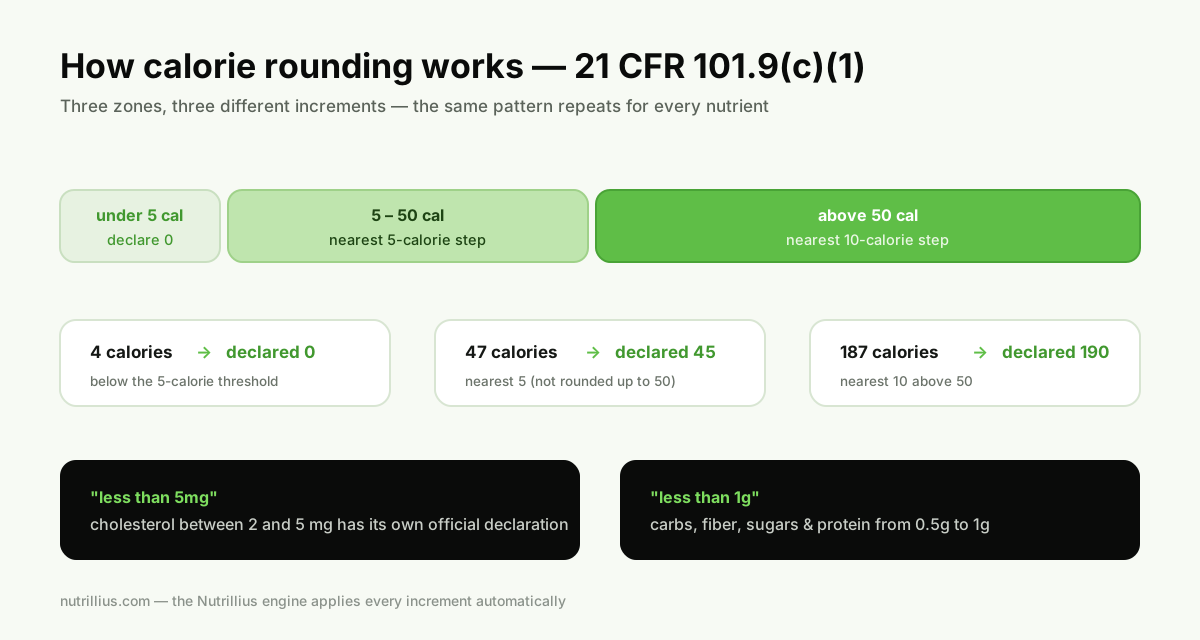
21 CFR 101.9(c) doesn’t just list which nutrients go on the panel — it prescribes the exact increments each one must be declared in. Printing “187 calories” or “3.27g fat” isn’t extra-precise; it’s non-compliant. The rules exist so every label in the store speaks the same numerical language. Below are the tables, in the same order they appear on the panel.
Calories — 101.9(c)(1)
| Calculated amount | Declare as |
|---|---|
| Less than 5 cal | 0 |
| 5 – 50 cal | Nearest 5-calorie increment |
| Above 50 cal | Nearest 10-calorie increment |
Examples: 4 → 0 · 47 → 45 · 52 → 50 · 55 → 60 · 187 → 190. The same scheme applies to “Calories from saturated fat” if voluntarily declared.
Total fat, saturated fat, trans fat — 101.9(c)(2)
| Calculated amount | Declare as |
|---|---|
| Less than 0.5g | 0g |
| 0.5 – 5g | Nearest 0.5g increment |
| Above 5g | Nearest 1g increment |
Examples: 0.4g → 0g · 2.3g → 2.5g · 7.6g → 8g. The infamous consequence: a product with 0.4g of trans fat per serving legally declares 0g trans fat — one reason serving sizes get scrutinized.
Cholesterol — 101.9(c)(3)
| Calculated amount | Declare as |
|---|---|
| Less than 2mg | 0mg |
| 2 – 5mg | “less than 5mg” |
| Above 5mg | Nearest 5mg increment |
Examples: 1mg → 0mg · 3mg → “less than 5mg” · 8mg → 10mg.
Sodium & potassium — 101.9(c)(4)–(5)
| Calculated amount | Declare as |
|---|---|
| Less than 5mg | 0mg |
| 5 – 140mg | Nearest 5mg increment |
| Above 140mg | Nearest 10mg increment |
Examples: 4mg → 0mg · 138mg → 140mg · 145mg → 150mg. Potassium follows the same increments as sodium. (The 140mg breakpoint is no accident — it’s the “low sodium” claim threshold.)
Total carbohydrate, fiber, sugars, added sugars, protein — 101.9(c)(6)–(7)
| Calculated amount | Declare as |
|---|---|
| Less than 0.5g | 0g |
| 0.5g – under 1g | “less than 1g” (or “<1g”) |
| 1g and above | Nearest 1g increment |
Examples: 0.4g → 0g · 0.7g fiber → “less than 1g” · 24.4g carbs → 24g · 12.5g protein → 13g (round half up at the gram).
Vitamins & minerals — 101.9(c)(8)
Vitamin D, calcium, iron and potassium must be declared as quantitative amounts and%DV. FDA guidance rounds the quantitative amounts to increments scaled to each nutrient’s RDI — in practice: vitamin D and iron to the nearest 0.1 (mcg/mg), calcium to the nearest 10mg, and potassium per the sodium-style mg table above. Amounts small enough to round to zero are declared 0.
% Daily Value — 101.9(d)(7)
- %DV = per-serving amount ÷ Daily Value, expressed to the nearest whole percent.
- You may compute it from the unrounded amount (more accurate) or the declared amount — Nutrillius uses unrounded.
- No %DV exists for trans fat or total sugars; protein %DV is only required in specific cases (e.g. protein claims, foods for children).
Worked example: one cookie, start to finish
Say your calculated per-serving values for one 30g cookie are: 142.7 cal · 7.61g fat · 2.28g sat fat · 3.2mg cholesterol · 143.8mg sodium · 18.43g carbs · 0.68g fiber · 9.7g sugars · 2.42g protein. After 101.9(c):
| Nutrient | Calculated | Declared |
|---|---|---|
| Calories | 142.7 | 140 |
| Total fat | 7.61g | 8g |
| Saturated fat | 2.28g | 2.5g |
| Cholesterol | 3.2mg | less than 5mg |
| Sodium | 143.8mg | 140mg |
| Total carbohydrate | 18.43g | 18g |
| Dietary fiber | 0.68g | less than 1g |
| Total sugars | 9.7g | 10g |
| Protein | 2.42g | 2g |
Nine nutrients, five different rounding regimes, two special “less than” declarations — for every recipe revision. This is precisely the kind of work software should do for you.
Where rounding meets nutrient content claims
Rounding isn’t just cosmetic — it interacts directly with the marketing claims you’re allowed to make, because claim thresholds are evaluated against your product’s actual per-serving amounts:
- “Calorie free” — fewer than 5 calories per serving (the same threshold that rounds to 0).
- “Low sodium”— 140mg or less per serving; notice 140mg is exactly where sodium’s rounding increment changes.
- “Fat free”— less than 0.5g per serving; “low fat” — 3g or less.
- “Sugar free” — less than 0.5g sugars per serving.
Two practical consequences. First, a nutrient that legally rounds to zero doesn’t automatically earn the matching “free” claim — each claim has its own definition and conditions in 21 CFR 101 subpart D, and some also restrict what else must be true of the food. Second, making any claim raises the stakes on your underlying numbers: claims invite scrutiny, and regulators evaluate them against actual composition, not your rounded label. If a claim is central to your marketing, consider lab-verifying that one number — the cost guide covers when that’s worth it.
nutrillius · free to build
Skip the rounding spreadsheet
Nutrillius applies every increment on this page automatically — including the 'less than 5mg' and 'less than 1g' declarations — and recalculates the moment you tweak an ingredient. Free to build; pay only when you download.
Create Label Now →No account needed · PNG · PDF · SVG from $39
Frequently asked questions
Why does my label say 0g when the ingredient clearly contains some fat?
Because the FDA requires it. Any nutrient amount below its “express as zero” threshold — under 0.5g for fat, under 5mg for sodium, under 5 calories — must be declared as 0. This is why cooking sprays legally say “0 calories” per (tiny) serving. It’s not deception when it follows the rule; it’s compliance.
Do I round before or after calculating % Daily Value?
The FDA allows %DV to be calculated from either the declared (rounded) amount or the actual (unrounded) amount. Using the unrounded amount is more accurate, and it’s what Nutrillius does — which sometimes produces a %DV that looks slightly “off” from the rounded gram amount. Both are compliant; unrounded is more defensible.
What does “less than 1g” mean on a label?
For carbohydrate, fiber, sugars, added sugars and protein, an amount that is at least 0.5g but below 1g may be declared as “less than 1g” (or “<1g”). Similarly, cholesterol between 2mg and 5mg is declared “less than 5mg”. These are the regulation’s official in-between declarations.
Do rounding rules differ for supplements?
Supplement Facts panels (21 CFR 101.36) follow closely related but not identical conventions — amounts are generally declared to appropriate significant figures rather than the food increments, and ingredients without RDIs are listed differently. Don’t reuse a food label template for a supplement.
Can software really get this right?
Yes — rounding is the most automatable part of labeling because it’s purely mechanical. The Nutrillius engine implements each increment on this page and is verified against boundary cases (4 cal → 0, 47 → 45, 55 → 60, 3mg cholesterol → “less than 5mg”, 0.7g fiber → “less than 1g”…). Every label it generates applies these rules automatically.
Sources & references
Written from the primary regulation. We link the actual rule so you can verify every serving size, threshold and requirement at the source.
Keep reading
How to make a nutrition facts label (2026 FDA guide)
The full eight-step process — serving sizes, nutrient data, formats, ingredients and allergens.
Read →How much does a nutrition label cost?
Nutritionist vs lab vs software, with real price ranges for each route.
Read →The best nutrition label generators, compared
Which tools actually implement these rounding rules — and which leave the math to you.
Read →Nutrition labels for cottage food businesses
When home-kitchen producers need a Nutrition Facts panel at all.
Read →